
Category: PPP
Reduce IP addressing errors in lab environment
One of the most tedious tasks in the initial lab setup (at least for me) is the IP address configuration, which usually includes a number of typos and mixups on the WAN links. You can simplify then WAN address configuration if you configure only one end of the WAN link and let PPP do the rest. For example, you could use the following configuration to configure WAN link on your core router …
Remove unwanted PPP peer route
When IOS started supporting dynamic allocation of IPCP (IP over PPP) addresses, it also got the mechanism to insert a dynamic host route toward the neighbor's IP address once the IP addresses were negotiated. This mechanism makes perfect sense in dynamic address allocation environments, as the subnet mask is not negotiated with IPCP. Without a host route toward the other end of the PPP link, there would be no easy way to reach the IP prefixes reachable via the PPP link.
Configure DNS Servers Through IPCP
After I've fixed the default routing in my home office, I've stumbled across another problem: the two ISPs I'm using for my primary and backup link have DNS servers that reply solely to the DNS requests sent from their own IP address range:
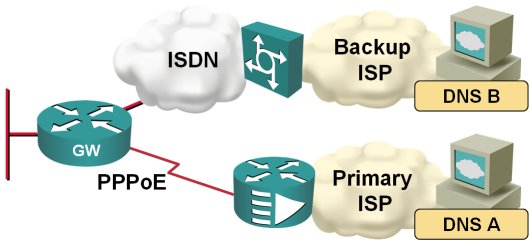
When the traffic is switched from the primary to the backup ISP, I therefore also need to switch the DNS servers. Fortunately, this is quite easy to do on a router; you just need to configure ppp ipcp dns request on the dialer interface and the router starts asking for the DNS server address as part of the IPCP negotiation.
Install default route with PPP
In my home office, I'm using DSL access to the Internet with ISDN backup to another ISP, as shown on the next figure:
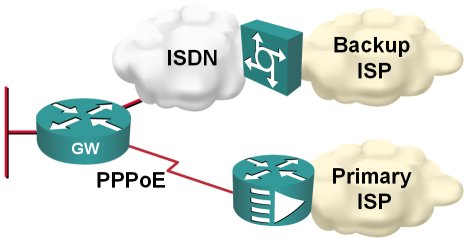
Obviously, I would like the ISDN backup to kick in whenever the primary connection goes down; two static default routes and reliable static routing on the primary default seem like a perfect solution.
Emulate dialup links with serial lines
I had to figure out various PPP parameters (and associated Cisco IOS behavior) and didn't have real dial-up equipment in my lab setup. I could have gone with PPPoE, but it turned out it's way simpler to emulate dialup connections (at least the PPP negotiations work as expected) on fixed serial lines. This is the minimum setup you need on the “caller” side …
interface Serial1/0
 ip address negotiated
 encapsulation ppp
 ppp authentication pap optional
 ppp pap sent-username client password 0 client
… and this is the “server”-side configuration: