
ARP with EVPN Asymmetric IRB
TL&DR: With the right nerd knob settings, it all works
In a previous blog post, I described the ARP issues you’ll encounter when using centralized routing (on a spine switch) between two EVPN MAC-VRF instances (a fancy name for a VLAN encapsulated in VXLAN or MPLS).
That blog post established a baseline that will help us unravel the ARP behavior in a more realistic scenario: asymmetric Integrated Routing and Bridging (IRB). That’s a mouthful, but it’s really quite a simple concept; the following diagram explains the asymmetric forwarding behavior:
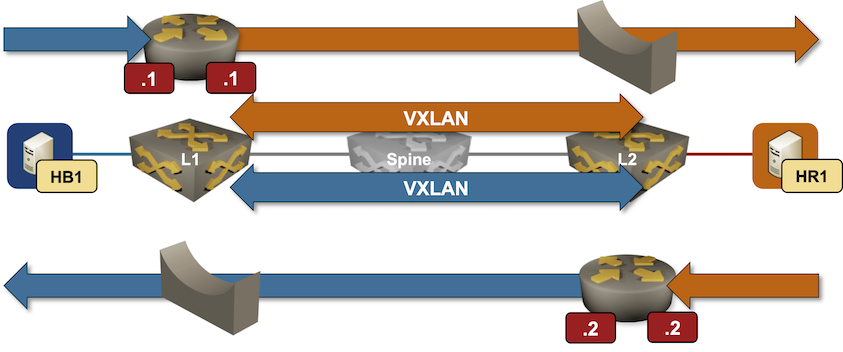
Packet forwarding in an EVPN asymmetric IRB design
- Every PE device has an IP address in every VLAN (EVPN MAC-VRF instance)
- Today, we’ll ignore fanboys yelling “ANYCAST GATEWAY” (we’ll get there) and assume the PE devices have different IP addresses.
- Every host uses the closest PE device as its first-hop gateway.
In our small topology, HB1 uses Blue.11 as the default gateway, and HR1 uses Red.2.
Here’s how HB1 sends the first packet to HR1:
- HB1 sends an ARP request for its default gateway. When L1 receives the ARP request, it REALLY SHOULD generate a MAC+IP route for HB1 (if this sounds like Latin, you REALLY SHOULD read the previous blog post)
- HB1 sends the packet for HR1 to L1.
- If we’re lucky, L1 already has an entry for HR1 in its ARP cache and can just forward the packet.
- Otherwise, L1 has to send an ARP request over VXLAN into the red VLAN, opening the can of worms we copiously investigated in the centralized routing blog post2.
We’d all love to be lucky, right? Here are the mandatory prerequisites for reaching eternal bliss in this particular design:
- PE device MUST create ARP entries from MAC+IP routes3
- End-hosts MUST NOT be silent and MUST send an ARP request for the first-hop gateway early in their lifetime4. That’s usually the case unless you’re dealing with minimalistic containers running something like syslog servers.
Do EVPN Implementations Work This Way?
Is that how EVPN devices work with their default settings? You can try it out with this netlab topology:
- Start the lab with your favorite devices (use
-d somethingnetlab up parameter). - Ping L1 from HB1. Inspect the ARP cache in the tenant VRF on L1. It should include an entry for HB1 (172.16.1.4)5
l1#show arp vrf tenant
Legend:
 not learned: Associated MAC address is not present in the MAC address table
 -: Static (configuration or programmed by feature)
Address         Age (sec)  Hardware Addr   Interface
172.16.0.2        0:20:45  001c.7393.0e6a  Vlan1000, not learned
172.16.1.2        0:20:45  001c.7393.0e6a  Vlan1001, not learned
172.16.1.4        0:00:08  aac1.ab5c.859a  Vlan1001, Ethernet2
- Inspect type-2 EVPN routes on L2. There should be a route for IP address 172.16.1.4:
l2#show bgp evpn route-type mac-ip 172.16.1.4 detail
BGP routing table information for VRF default
Router identifier 10.0.0.2, local AS number 65000
BGP routing table entry for mac-ip aac1.ab5c.859a 172.16.1.4, Route Distinguisher: 10.0.0.1:1001
 Paths: 1 available
  Local
    10.0.0.1 from 10.0.0.1 (10.0.0.1)
      Origin IGP, metric -, localpref 100, weight 0, tag 0, valid, internal, best
      Extended Community: Route-Target-AS:65000:1001 TunnelEncap:tunnelTypeVxlan
      VNI: 101001 ESI: 0000:0000:0000:0000:0000
- Check the ARP table for the tenant VRF on L2. It should include an entry for 172.16.1.4. The lack of age field on Arista EOS means ‘we got this from EVPN’:
l2#show arp vrf tenant
Legend:
 not learned: Associated MAC address is not present in the MAC address table
 -: Static (configuration or programmed by feature)
Address         Age (sec)  Hardware Addr   Interface
172.16.0.1        0:24:27  001c.7321.8ca9  Vlan1000, not learned
172.16.1.1        0:24:27  001c.7321.8ca9  Vlan1001, not learned
172.16.1.4              -  aac1.ab5c.859a  Vlan1001, Vxlan1
- Finally, Arista EOS includes a convenient show bgp evpn arp command:6
l2#show bgp evpn arp
VLAN  Label  Encap IP                 MAC             Tunnel Endpoint    Seq#
----- ------ ----- ------------------ --------------- ------------------ ------
1001  101001 VXLAN 172.16.1.4         aac1.ab5c.859a  10.0.0.1           -
Try It Out
The lab topology I used in this blog post is in the netlab-examples GitHub repository. If you want to try it out:
- Set up your lab environment (you can use free GitHub Codespaces)
- Change directory to
EVPN/asymmetric-irb - Execute netlab up and explore
-
First IP address in the Blue prefix ↩︎
-
Did you notice I mentioned that blog post four times already? Take the hint if you haven’t read it yet. ↩︎
-
We’re obviously in deep trouble if they’re ignoring those hints, aren’t we? ↩︎
-
Silent hosts? You’re clearly out of your daily allowance of luck. ↩︎
-
Hint: use netlab report addressing to display IP addresses used in the lab ↩︎
-
But it’s more fun to take the scenic route, right? ↩︎
Another great article and lab, Ivan!
I’d throw an extra challenge out to the inquisitive readers: How could you force Symmetric IRB forwarding in this exact lab while keeping an IP address in every VLAN on every PE? In other words, what specifically influences Symmetric vs Asymmetric forwarding behavior?
Thank you. Eventually getting there... ;), the corresponding lab exercise is here: https://evpn.bgplabs.net/evpn/9-arp-routes/
FRR installs type-2 routes into the Linux Kernel with the
NOARPflag set:The
arpcommand fromnet-toolsreads the/proc/net/snmpfile to display ARP entries:/* Open the PROCps kernel table. */ if ((fp = fopen(_PATH_PROCNET_ARP, "r")) == NULL) { perror(_PATH_PROCNET_ARP); return (-1); }The Linux Kernel skips all
NOARPentries when emitting/proc/net/snmpand explains the rationale in a helpful comment:static void *arp_seq_start(struct seq_file *seq, loff_t *pos) { /* Don't want to confuse "arp -a" w/ magic entries, * so we tell the generic iterator to skip NUD_NOARP. */ return neigh_seq_start(seq, pos, &arp_tbl, NEIGH_SEQ_SKIP_NOARP); }The modern
ipcommand from theiproute2suite uses the much more capable and sophisticatedrtnetlinkinterface to interact with the Kernel.Best regards, Sebastian
Thanks a million for taking the time and writing such a detailed explanation!!!
Much obliged! Ivan
Another great post, Ivan!
The problem with missing ARP entries and BUM traffic in EVPN-VXLAN environments is real. People often read somewhere that EVPN-VXLAN helps you avoid BUM and assume it just goes away. But what I've seen a couple of times is cloud and hosting providers packing 10-20 /24 subnets into a single VLAN/VNI and leaving half of the address space unused. Point a single IP scanner at that range, and the fabric drowns in BUM traffic - every probe to a non-existent host triggers an ARP that floods VXLAN-wide, constantly.
And as you point out in the post, asymmetric IRB makes this particularly bad - the ingress PE has to ARP into the destination VLAN over VXLAN for every probe, so the flood fans out across every VTEP carrying that VNI. Symmetric IRB at least localizes the ARP to the egress PE. The real fix in most of those cases, though, is to move to a Type-5-only design with smaller L2 segments. But I suspect that's a post for another day ;)
On the multi-vendor side, the ARP suppression default itself is a fantastic trap. I had to re-learn every time how to turn it on/off for each vendor - and in some cases even per OS version.
Thanks a million! It's always great to hear real-life feedback.