
EVPN Centralized Routing with Arista EOS
TL&DR: SIP of Networking Was an Understatement 🤦♂️
A month ago, I described ARP issues in EVPN centralized routing design, and Naveen Kumar Devaraj was kind enough to add some Arista EOS implementation details. Today, let’s explore what EVPN routes Arista EOS generates in that scenario. We’ll use a very simple lab topology with a spine switch acting as a router. The leaf switches are layer-2 switches.
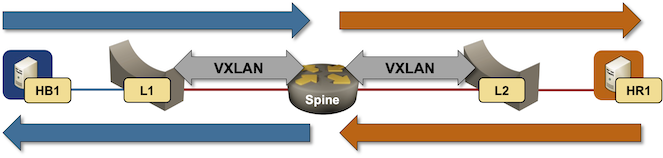
Packet forwarding in centralized routing design
When the lab is started, all switches advertise IMET routes for the attached VLANs:
l1#show bgp evpnBGP routing table information for VRF defaultRouter identifier 10.0.0.2, local AS number 65000Route status codes: * - valid, > - active, S - Stale, E - ECMP head, e - ECMPc - Contributing to ECMP, % - Pending best path selectionOrigin codes: i - IGP, e - EGP, ? - incompleteAS Path Attributes: Or-ID - Originator ID, C-LST - Cluster List, LL Nexthop - Link Local NexthopNetwork Next Hop Metric LocPref Weight Path* > RD: 10.0.0.1:1000 imet 10.0.0.110.0.0.1 - 100 0 i* > RD: 10.0.0.1:1001 imet 10.0.0.110.0.0.1 - 100 0 i* > RD: 10.0.0.2:1000 imet 10.0.0.2- - - 0 i* > RD: 10.0.0.3:1001 imet 10.0.0.310.0.0.3 - 100 0 i
The leaf switches are advertising one IMET route each (they have a single MAC-VRF instance), the spine switch is advertising two IMET routes (it has two MAC-VRF instances within an IP-VRF instance).
Next, let’s ping the default gateway (the spine switch) from one of the hosts:
hb1:/# ip routedefault via 192.168.121.1 dev eth010.0.0.0/24 via 172.16.1.1 dev eth110.1.0.0/16 via 172.16.1.1 dev eth110.2.0.0/24 via 172.16.1.1 dev eth1172.16.0.0/16 via 172.16.1.1 dev eth1172.16.1.0/24 dev eth1 scope link src 172.16.1.4192.168.121.0/24 dev eth0 scope link src 192.168.121.104hb1:/# ping 172.16.1.1 -c 3PING 172.16.1.1 (172.16.1.1): 56 data bytes64 bytes from 172.16.1.1: seq=0 ttl=64 time=14.586 ms64 bytes from 172.16.1.1: seq=1 ttl=64 time=2.449 ms64 bytes from 172.16.1.1: seq=2 ttl=64 time=2.351 ms
Before HB1 could send an IP packet to Spine, it had to send an ARP request. Spine could either use ARP gleaning or do an independent ARP resolution when replying to the ICMP Echo request. Regardless of those details, the ARP cache on Spine now contains an entry for HB1:
spine#show arp vrf tenantLegend:not learned: Associated MAC address is not present in the MAC address table-: Static (configuration or programmed by feature)Address Age (sec) Hardware Addr Interface172.16.1.4 0:02:48 aac1.ab85.ab1f Vlan1001, Vxlan1
The ARP entry belongs to the interface Vlan1001 and is reachable over VXLAN. No surprises there.
What about the MAC-IP routes? The leaf switch is advertising the MAC address of HB1; the spine switch is not advertising anything because the IP address of HB1 was learned over the VXLAN interface:
spine#show bgp evpn route-type mac-ipBGP routing table information for VRF defaultRouter identifier 10.0.0.1, local AS number 65000Route status codes: * - valid, > - active, S - Stale, E - ECMP head, e - ECMPc - Contributing to ECMP, % - Pending best path selectionOrigin codes: i - IGP, e - EGP, ? - incompleteAS Path Attributes: Or-ID - Originator ID, C-LST - Cluster List, LL Nexthop - Link Local NexthopNetwork Next Hop Metric LocPref Weight Path* > RD: 10.0.0.3:1001 mac-ip aac1.ab85.ab1f10.0.0.3 - 100 0 i
Conclusion:
- The central router (spine switch) DOES NOT advertise MAC+IP route for hosts attached to its VLANs.
- In scenarios with multiple routers attached to MAC-VRF instances, each router MUST do its own ARP resolution.
Aside:
- You could configure ARP snooping on L1/L2 to make them advertise MAC+IP instead of MAC routes for attached hosts. That would give the central router enough information so it wouldn’t have to do ARP resolution on its own.
- Some EVPN implementations need ARP snooping to work (the central router will NOT send ARP requests over VXLAN).
What about packet flow? As I mentioned in the original blog post, if the central router does not advertise its MAC address, the leaf switches MUST flood all routed traffic1. That’s exactly what’s going on when you use minimal EVPN configuration on Arista EOS (remember: we saw no MAC/IP route for the default gateway’s MAC address):
interface Vlan1000description VLAN red (1000) -> [hr1,l1]vrf tenantip address 172.16.0.1/24!interface Vlan1001description VLAN blue (1001) -> [hb1,l2]vrf tenantip address 172.16.1.1/24!router bgp 65000!vlan 1000rd 10.0.0.1:1000route-target import 65000:1000route-target export 65000:1000redistribute learned!vlan 1001rd 10.0.0.1:1001route-target import 65000:1001route-target export 65000:1001redistribute learned
Notes:
- The above configuration was generated by netlab release 26.05. The central router does not need the redistribute learned command on the MAC-VRF instances, as it has no directly attached hosts.
If we want to stop the flooding of routed traffic, we MUST configure the central router to advertise at least its MAC address (advertising MAC+IP would be even better). On Arista EOS, use the redistribute router-mac system command2 on the MAC-VRF instances to advertise just the default gateway’s MAC address or redistribute router-mac system ip to advertise the MAC+IP EVPN type-2 route.
When adding that command to both MAC-VRF instances on the Spine switch, the Spine switch starts advertising its VLAN MAC addresses and the default gateway IP addresses, resulting in a well-behaved EVPN fabric.
spine#show bgp evpn route-type mac-ipBGP routing table information for VRF defaultRouter identifier 10.0.0.1, local AS number 65000Route status codes: * - valid, > - active, S - Stale, E - ECMP head, e - ECMPc - Contributing to ECMP, % - Pending best path selectionOrigin codes: i - IGP, e - EGP, ? - incompleteAS Path Attributes: Or-ID - Originator ID, C-LST - Cluster List, LL Nexthop - Link Local NexthopNetwork Next Hop Metric LocPref Weight Path* > RD: 10.0.0.1:1000 mac-ip 001c.733a.3232 172.16.0.1- - - 0 i* > RD: 10.0.0.1:1001 mac-ip 001c.733a.3232 172.16.1.1- - - 0 i* > RD: 10.0.0.3:1001 mac-ip aac1.ab85.ab1f10.0.0.3 - 100 0 i
Mission Accomplished ;)
Try It Out
The lab topology I used in this blog post is in the netlab-examples GitHub repository. If you want to try it out:
- Set up your lab environment (you can use free GitHub Codespaces)
- Change directory to
EVPN/central-routing - Execute netlab up and explore
Hi Ivan,
Thanks for continuing to dive into the somewhat murky world of centralized IRB/SVI (I hesitate to use gateway carte blanche these days given all the GW functionality in RFC9014 and IPVPN-EVPN interworking)
You are correct that the centralized IRB VTEP does not advertise on the MAC+IP in this configuration because, as you pointed out, it is learnt over VXLAN in the data-plane (realized by the timer being present in the arp entry; it's not persistent with a
-).There are two options if you want to move this into the control plane:
1) - As you mentioned enable arp snooping on the leaf. Now a MAC+IP route is advertised with the L2 VNI form the leaf. All remote TEPs now learn and install this ARP, including the centralized IRB TEP. Inter-subnet routing is still on the centralized TEP. Note the centralized TEP still does NOT re-advertise this MAC+IP with itself as the NH in this case.
2) - More recently in the EVPN VXLAN Gateway development (yes GW :)), the central GW can now re-advertise ARP's learnt over the data-plane, setting itself as the next-hop for these type-2's. This negates the need for arp snooping on the leafs. This is useful in environments where arp snooping is not available on the L2 only VTEPs. In this configuration the centralized VTEP with IRB/SVI is also a GW for the L2 TEPs given it's changing the NH for the EVPN T2 MAC+IP routes. This capability is covered in detail in the following TOI: https://www.arista.com/en/support/toi/eos-4-36-0f/23960-centralized-routing-on-dci-gateway-for-l2-only-vteps
As mentioned in other comments, this centralized deployment is the lesser chosen option, for all the reasons illustrated in these posts - i.e. there's a lot going on behind the scenes, and state is centralized, leading to larger blast radii. That being said, over time, adding all of these enhancements has made the deployment option more flexible and robust..
Thanks Russell