
BGP Labs: Graceful Degradation for Unsupported Devices
A few weeks ago, I described the changes in the online BGP labs that allow you to use most of the common network operating systems as “external” routers1. However, while we keep improving it, netlab still can’t configure all BGP features on all supported devices (PRs from Nokia and Mikrotik fans would be highly appreciated 😎), which means that it’s possible to configure your environment in a way where some of the more complex labs would simply fail to start.
The limited choice of devices for external routers was always well-documented (example), but if you insisted on using unsupported devices, the lab would fail to start with an error message, and you’d have to tweak the lab topology (example). Wouldn’t it be better to start the lab with a warning?
There’s Always a Story Behind a Feature
I was facing a similar dilemma in the netlab integration testing:
- I wanted to use the minimum number of tests. Each test can easily take a half-hour to complete across all tested devices.
- We have to test many features in multiple scenarios. For example, we test BGP default route origination in the global routing table and in a VRF.
- Sometimes, we don’t implement the prerequisite feature (example: VRFs) on all devices that support the tested feature (example: BIRD), which would result in a test failure, although the feature itself is properly implemented.
VRFs were the major pain. The first solution was thus a plugin that adjusted the lab topology based on whether the tested device supports VRFs. A slightly more refined solution would do fixups based on device type (example), turning test failures into warnings.
As the number of exceptions grew, I decided to go for a generic plugin that adjusts the lab topology and the validation tests based on the available features of the tested device. For example, the BGP aggregation test removes routing policies used in suppress maps and the related validation tests if the device we’re testing supports BGP route aggregation but not routing policies.
Back to BGP Labs
That plugin (with a few adjustments) turned out to be a perfect fit for the BGP labs (example). Instead of a hard error, the lab starts, but generates a warning and an explanation, hopefully prompting the user to reread the documentation.

Before: Error generated when trying to start a BGP policy lab with Mikrotik external routers
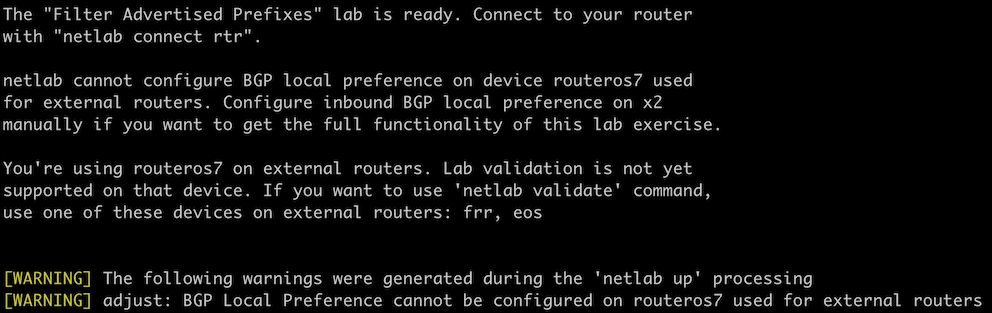
After: Using an unsupported device results in a warning and a help message
Want to know the details? The source code is online; follow the “example” links in this blog and explore. Want even more details? Open a discussion in netlab GitHub repository.
I hope I got the adjustments right in all lab exercises; if you experience any problems, please report them by opening a GitHub issue.
-
External as in “you don’t need to configure them”. They are obviously still part of the lab. ↩︎