
Hammers and nails
If you’re on the buying side of the IT industry, you’ll love the “42 is the answer” post by Storagebod. The really fun part describes vendors trying to properly position themselves ... and failing in the process:
When all you have is a hammer, every problem looks a nail but even if your hammer is the best hammer in all the world and sure you could bang in a screw, at the end of the day, there will be dissatisfaction with results.
BTW, his question that gives the answer 42 is way too narrow (although personally relevant; just read his post); Douglas Adams took a much wider perspective.
Off-topic: Maybe it’s you, not the Internet
Scott Berkun has (yet another) fantastic article on his blog: a teacher was complaining that the students use Facebook or check their e-mail in class. Scott’s response? Maybe it’s the teaching skills and the fascination with one-way lecturing, not the Internet, that’s at fault. Read the whole response; if you’ve been faced with too many narrow-minded teachers in your life, you’ll enjoy it as much as I did.
Thank you for all the webinar help!
The Wednesday's Building IPv6 Service Provider Core was a huge success (compared to the previous one); I had three times as many attendees from all over the world (map below) even though the topic was highly technical and pretty limited in scope. I can’t tell you how delighted I am that it went so well and I would like to thank (again) everyone who chimed in with improvement ideas.

Is anyone using MPLS/VPN over mGRE?
RFC 4364 (also known as RFC 2547bis from its draft days) specifies two methods of transporting VPN packets between PE-routers: well-known MPLS transport and GRE transport. The GRE transport idea is extremely simple: you take the labeled VPNv4 packet, put it into a GRE envelope, set the GRE Ethertype field to MPLS Unicast (0x8847) and send the GRE packet to the IP address of the egress PE-router.
This is not the same mechanism as running MPLS over point-to-point LDP-enabled GRE tunnels or running MPLS over DMVPN tunnels; this one does not require multiple tunnels or LDP/NHRP to work.
Traffic grooming in optical networks
 SearchTelecom has just published my new article: Traffic grooming in optical networks: Making real-world choices. If you’re new to the optical networking (or if you’ve been bedazzled by vendors’ marketing departments), you’ll probably find it a useful introductory text.
As the production-grade all-optical traffic grooming solutions don’t exist yet, the only short answer anyone (apart from people trying to sell you specific gear) can give you on this topic is “it depends”. You have to evaluate your needs, do several alternative designs, and find the design that best fits your needs, your budget and your long-term cost expectations.
Dear Cisco marketing: routers are not iPhones
As Network World writes, the latest product announcements from Cisco were met with the “so what” attitude. As one of my recent pet projects dealt with improving presentation skills, I found it interesting to try to understand the marketing techniques used in these announcements. The Presentation secrets of Steve Jobs book was a great help. Among other advices given by its author, you’ll find these:
Create Twitter-like Headlines ... but there’s a difference between already far-fetched “Apple reinvents the phone” (Steve Jobs @ iPhone launch) and CRS-3 will forever change the Internet.
Server-to-server file transfers with FTP
Did you know that you could do server-to-server file transfers with FTP? I didn’t; this little gem (usually known as FXP – File eXchange Protocol) was described by davro and g in comments to the FTP Butterfly Effect post.
If you’re using FXP, please write a comment; although I am well aware why it was extremely useful 25 years ago, I’m wondering how many people are actually using it today.
L2TP: The revenge of hardware switching
Do you like the solutions to the L2TP default routing problem? If you do, the ASR 1000 definitely doesn’t share your opinion; so far it’s impossible to configure a working combination of L2TP, IPSec (described in the original post) and PBR or VRFs:
PBR on virtual templates: doesn’t work.
Virtual template interface in a VRF: IPSec termination in a VRF doesn’t work.
L2TP interface in a VRF: This one was closest to working. In some software releases IPSec started, but the L2TP code was not (fully?) VRF-aware, so the LNS-to-LAC packets used global routing table. In other software releases IPSec would not start.
L2TP default routing: solutions
There are three tools that can (according to a CCIE friend of mine) solve any networking-related problems: GRE tunnels, PBR and VRFs. The solutions to the L2TP default routing challenge nicely prove this hypothesis; most of them use at least one of those tools.
Policy-based routing on virtual template interface. Use the default route toward the Internet and configure PBR with set default next-hop on the virtual template interface. The PBR is inherited by all virtual access interfaces, ensuring that the traffic from remote sites always passes the network core (and the firewall, if needed).
Small Steps to Large Complexity
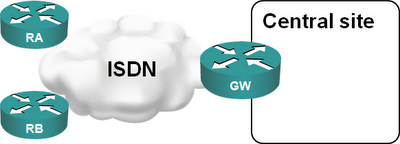
Imagine you have a large retail network: your remote offices use ISDN to dial into the central site and upload/download whatever periodic reports they have. Having a core router connected to an ISDN PRI interface is the perfect solution:
A few years later, ISDN is becoming too slow for your increased traffic needs and you want to replace it with DSL or VPN-over-Internet solution. Your Service Provider offers you PPPoE forwarding with L2TP. This is a perfect solution as it allows you to minimize the changes: