
Category: WAN
PPP default route
You do not need the route "ip route 0.0.0.0 0.0.0.0 Dialer0 10 track 100" and the tracking if you configure "ppp ipcp route default" on the dialer interface. Works the same way... :-)You might be wondering why Cisco's engineers decided to pollute IOS with yet another feature. The problem they had was the way PPP over Frame Relay is implemented: it uses virtual interfaces and although you have a very static connection, you cannot bind a static interface name to it. A dynamic interface (with potentially changing name) is cloned from the virtual template every time the PPP-over-Frame-relay session is started. Obviously you cannot configure a static default route pointing to it in advance, so you need yet another feature to do it (I'll not even try to figure out how to create non-default static routes pointing to cloned interface).
The Impact of tx-ring-limit
Setting the size of the hardware output queue in Cisco IOS with the (then undocumented) tx-ring-limit (formerly known as tx-limit) has been a big deal when I was developing the first version of the QoS course that eventually became the initial release of the Implementing Cisco Quality of Service training.
However, while it's intuitively clear that the longer hardware queue affects the QoS, years passed before I finally took the time to measure the actual impact.
Almost-Dynamic Routing over ADSL Interfaces
Recently I had to implement Internet access using ADSL as the primary link and ISDN as the backup link. Obviously the most versatile solution would use the techniques described in my Small Site Multi-homing articles, but the peculiarities of Cisco IOS implementation of the ADSL technology resulted in a much simpler solution.
IOS implementation of PPPoE links uses dialer interfaces. However, the “dialing” on these interfaces is activated as soon as the underlying PPPoE session is active (before the first interesting packet is routed to the interface). When the simulated dial-out occurs, the router starts PPP negotiations including the IPCP handshake, which usually results in an IP address assigned to the dialer interface. Net result: if the dialer interface has an IP address, the PPPoE session is obviously active (and vice versa).
WAN IP addresses and subnet masks
“What I would like to know is, on my PPP negotiated ADSL connection, how the ISP assigns me a /32 ip address.”… which prompted me to test various WAN encapsulations and address assignment rules. Here are the results:
- On all WAN encapsulations you can configure subnet masks down to /31 (/30 in old IOS releases).
- The same IP address can be used on more than one interface as long as both IP address and subnet mask match.
- Two WAN interfaces can have different IP addresses but still belong to the same IP subnet. You would use this on Frame Relay when you have multiple interfaces into the same FR cloud for bandwidth reasons.
- If you configure IP address with IPCP (with the ip address negotiated command), the subnet mask becomes /32 as IPCP does not carry subnet mask (and you get the host route toward the PPP peer unless you turn off the PPP peer route option)
- If you configure IP address with SLARP (Serial Line ARP) on HDLC, the subnet mask is inherited from the peer (HDLC SLARP carries subnet mask) and the IP address is determined by flipping the low-order bits in the neighbor's IP address.
Reduce IP addressing errors in lab environment
hostname Core-2… and use IPCP negotiation on the POP router to pick up the WAN IP address:
!
interface Serial1/0
description link to POP
ip address 10.0.2.1 255.255.255.252
encapsulation ppp
peer default ip address 10.0.2.2
hostname POP
!
interface Serial1/0
 description link to Core-1
 ip address negotiated
 encapsulation ppp
You should not configure no peer neighbor-route on the router that gets dynamic IP address, as the subnet mask is not assigned with IPCP; you need the IPCP-generated host routes if you want to do hop-by-hop telnet between the routers.
Remove unwanted PPP peer route
WAN emulation toolkit
Making the case for Layer 2 and Layer 3 VPNs
Occasionally someone would try to persuade me that the layer-2 VPN services are like aspirin (you know, totally harmless plus it could get rid of all your headaches). OK, that might be true if you take the layer-2 VPN offering as a pure transport solution and plug in an extra router (sometimes also called a layer-3 switch by marketing people) between the Service Provider’s Ethernet (or whatever they give you) and your LAN. But there are people who don’t know the details and plug the SP Ethernet straight into their L2 switch … and things might even work for a while … until the whole network collapses.
In my opinion, we need both L2 and L3 VPN services, but it’s important that they are positioned and deployed correctly. You can read more about my views on this topic in the SearchTelecom article Making the case for Layer 2 and Layer 3 VPNs.
Configure DNS Servers Through IPCP
After I've fixed the default routing in my home office, I've stumbled across another problem: the two ISPs I'm using for my primary and backup link have DNS servers that reply solely to the DNS requests sent from their own IP address range:
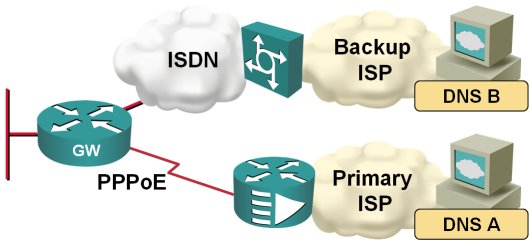
When the traffic is switched from the primary to the backup ISP, I therefore also need to switch the DNS servers. Fortunately, this is quite easy to do on a router; you just need to configure ppp ipcp dns request on the dialer interface and the router starts asking for the DNS server address as part of the IPCP negotiation.
Install default route with PPP
In my home office, I'm using DSL access to the Internet with ISDN backup to another ISP, as shown on the next figure:
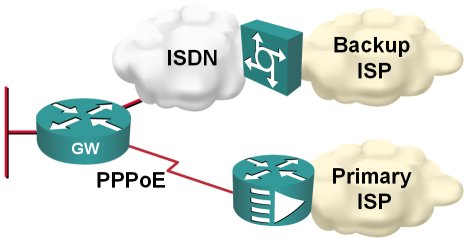
Obviously, I would like the ISDN backup to kick in whenever the primary connection goes down; two static default routes and reliable static routing on the primary default seem like a perfect solution.