
Category: DHCP
Restart IOS DHCP server after a change in DHCP pools
I've stumbled across an interesting problem recently:
- I've added a Linux box to my home network;
- It used my Cisco router to get a dynamic DHCP address;
- I've inspected the DHCP bindings on the Cisco router to find the new MAC address and configured a host DHCP pool as I'm using the Linux box as a server;
- Even after multiple configuration changes, the IOS would fail to use the host DHCP pool.
The only solution I've found was to restart the IOS DHCP server with the no service dhcp followed by service dhcp configuration commands. Obviously, you lose all DHCP bindings when you restart the DHCP server (which could be a problem if you use conflict logging) unless you've configured the router to store them in an external file.
DHCP Conflict between a Cisco Router and Windows DHCP Server
In a response to my post Redundant DHCP Server I've speculated that a Cisco router should coexist with a Windows-based DHCP server if you configure them with non-overlapping address ranges. I was wrong, Edgar Cahuana discovered that Microsoft's DHCP server wants to have complete control over the LAN it's serving and shuts down if it detects another DHCP server on the same LAN.
To make the two DHCP servers coexist, you have to disable rogue DHCP server detection in Windows DHCP server.
Assigning Server IP addresses with DHCP
Using DHCP to assign server IP addresses is usually not a wise decision. To start with, you have to define static DHCP mappings, which rely on client-id attribute in the DHCP request (usually the MAC address of the client). For me, the easiest way to find the correct client ID is as follows:
- Use DHCP to assign the IP address to the server
- Note the newly assigned IP address
- Use the show ip dhcp bindings | include ip-address command to display the client-id to IP address binding.
- Create a static DHCP mapping (for example, by configuring a host DHCP pool on the router) and release/renew IP address on the server
Don't miss the obvious
I've recently replaced my old home router (well, actually a combination of two low-end models, one could handle ISDN and the other one 3DES) with a 1812. After I've struggled past the “interesting” interface names (it has 8 switched ports, named FastEthernet2 to FastEthernet9) and brushed up my BVI/VLAN skills, configuring it was a breeze … only the DHCP server was causing me problems; every time my laptop would wake from the standby mode, it would take almost half a minute before it got the LAN IP address. The obvious suspect (as I've installed the 12.4(15)T on it) was the software, the next one DHCP ping timers.
DHCP conflict logging: the true story
The on-line configuration help for the ip dhcp conflict logging configuration command (logging: Record address conflicts in a log file) is one of the more misleading texts I've found in Cisco IOS (and the CCO documentation is not much better). Here's how it actually works ...
DHCP-based static routes
If you have configured your router as a DHCP client, you can use the default router option received in a DHCP reply as the next-hop for a static route. For example:
ip route 10.0.0.0 255.0.0.0 dhcp
You could use this functionality in scenarios where your core network uses DHCP (for example, in metropolitan networks using layer-2 Ethernet transport from an ISP), but your router needs a different default route.
You can also use this feature to change the administrative distance of the DHCP-based default route (or you could use the ip dhcp-client default-router distance value configuration command that one of the readers described in a comment to a previous DHCP-related post).
Import DHCP options from an upstream DHCP server
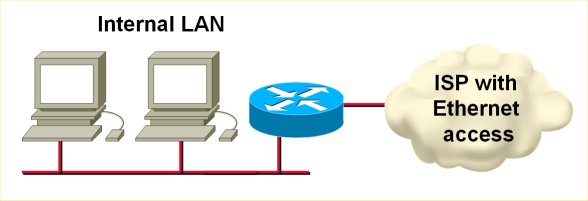
If your router gets its IP address from an upstream DHCP server, it can automatically import the other DHCP options (DNS server, WINS server, domain prefix etc.) into its DHCP pools. For example, if you use a router to connect to a cable or MAN Ethernet ISP (see the following figure), you can use the DHCP option import to minimize your router configuration (and make it fail safe from any changes in the ISP network).
Default DHCP client-id
If you configure a Cisco router as a DHCP client, you'll notice that it uses weird client-id in its DHCP requests (assuming you care about client IDs on the DHCP server). Instead of using the interface MAC address as the client ID (as most workstations do), the client ID is the string 'cisco-dotted.mac.ascii-ifname' where the dotted.mac.ascii is the interface MAC address in ascii and the ifname is the short interface name.
Obviously, if your ISP checks your MAC address (and at least most cable operators do), you might have a problem. To make the router behave like a workstation, use the ip address dhcp client-id interface-name configuration command. The new client ID will be the MAC address of the specified interface (which can be different from the interface you're configuring).
Inspection of router-generated traffic does not recognize DHCP client traffic
After I've published a post on how you can use the new router-traffic keyword to minimize the Internet-facing access list you use with CBAC, Euphrates Greene pointed out to me that this feature does not work for client DHCP traffic (if the router is acting as a DHCP client, for example, when connected to a MAN Ethernet environment).
Once you start thinking about what's really going on, it all becomes obvious: as the router has no IP address when it sends the DHCP request, and it sends the DHCP request to a broadcast address (as it doesn't know the IP address of the upstream DHCP server), there is no session that could be entered into the CBAC session table. So you still have to allow all DHCP traffic to your router with an access-list similar to this one:
DHCP and BOOTP coexistence
If you have an existing BOOTP environment (for example, a set of old Unix workstations and X-terminals) and want to deploy DHCP on the same LAN segment, you could run into interesting compatibility issues, as the DHCP servers by default responds to BOOTP requests.
However, IOS has an interesting feature when you use a router as a DHCP server: you can tell it to ignore the BOOTP requests with the ip dhcp bootp ignore global configuration command (introduced in 12.2T and 12.3). Even more, the router can respond to DHCP requests and forward BOOTP requests to a non-local BOOTP server configured with the ip helper-address interface configuration command.