
Install default route with PPP
In my home office, I'm using DSL access to the Internet with ISDN backup to another ISP, as shown on the next figure:
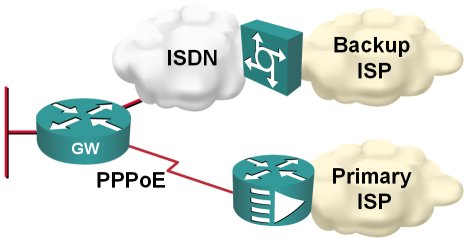
Obviously, I would like the ISDN backup to kick in whenever the primary connection goes down; two static default routes and reliable static routing on the primary default seem like a perfect solution.
Enable password or enable secret?
- Type-7 encryption used in enable password has been broken. Source code for the decrypt program and cracker programs are available online, or you could use a router to do it for you.
- The type-7 encryption is reversible (and easily breakable due to a weak algorithm), whereas type-5 encryption is a one-way encryption that probably requires a dictionary attack to break.
- Based on the previous two facts, you should never use enable password. Use enable secret.
- The service password-encryption encodes passwords attached to local usernames with type-7 encryption. The usage of type-7 encryption is necessary as you might need the cleartext passwords in some authentication mechanisms (for example, CHAP). However, it's still better to have scrambled passwords than cleartext ones; at least a casual observer will not be able to read them. Conclusion: use service password-encryption.
- If your authentication methods don't need cleartext passwords (examples: local username/password authentication, local AAA authentication or PAP authentication), use username secret configuration command (available from IOS releases 12.2T, 12.3 and 12.0S).
Emulate dialup links with serial lines
interface Serial1/0… and this is the “server”-side configuration:
ip address negotiated
encapsulation ppp
ppp authentication pap optional
ppp pap sent-username client password 0 client
interface Serial1/0To trigger PPP negotiations, shut down and re-enable the serial interface on either side.
ip address 10.0.0.33 255.255.255.252
encapsulation ppp
peer default ip address 10.0.0.34
ppp authentication pap callin
!
username client password client
Note: As I'm using PAP authentication, I could use the more secure username secret configuration command, which would not work with CHAP.
IPv6 Deployment: Time for Action?
A while ago I was asked to write an article about IPv6 training. I could just cover the training aspect, like what’s offered (answer: not much) and whether someone can train the whole operations team like you could in the IPv4 or MPLS/VPN world (answer: no), but I wanted to understand whether anyone is really using IPv6 in a production network.
I found a few academic networks (after all, there are about 2000 IPv6 prefixes assigned and someone should be doing something with them), but not much of what I would call a real production environment, which is a bad thing, as it looks like the IPv4 address space will get saturated in a few years.
Use BGP Default Route to Replace Static Routing
Martin Kluge sent me an interesting BGP question: he has two upstream links and runs BGP on both. Since his router is low on RAM, he cannot accept full routing, so he’s just announcing his IP prefix and using static default routing toward upstream ISPs.
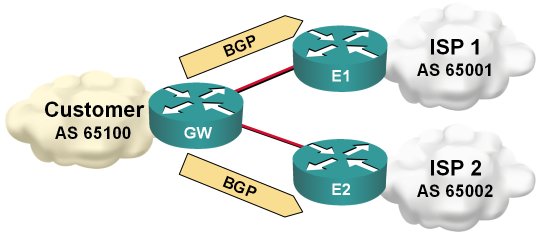
Static default routing toward upstream ISP
Type 7 decryption in Cisco IOS
We'll turn on type-7 encryption for local passwords and generate a test username
R1(config)#service password-encryption
R1(config)#username test password t35t:pa55w0rd
Next we'll inspect the generated username with the show running command
R1(config)#do show run | include username
username test password 7 08351F1B1D431516475E1B54382F
Now we'll create a key chain and enter the type-7 encrypted password as the key string …
R1(config)#key chain decrypt
R1(config-keychain)#key 1
R1(config-keychain-key)#key-string 7 08351F1B1D431516475E1B54382F
… and the show command does the decryption for us.
R1(config-keychain-key)#do show key chain decrypt
Key-chain decrypt:
    key 1 -- text "t35t:pa55w0rd"
        accept lifetime (always valid) - (always valid) [valid now]
        send lifetime (always valid) - (always valid) [valid now]
Show active IOS processes
- The [0-9.]+% pattern will match any non-zero percentage;
- The 0.00% pattern will obviously match the zero-percentage display;
- As the percentage figures are separated by various amounts of whitespace characters, we have to use the ' +' pattern to match those;
Persistent EEM variables
The real solution is based on the appl_setinfo and appl_reqinfo calls. They work, but like many other Tcl-related IOS features they are … well … weird.
Ones Are Slower than Zeroes
Thinking about the implications of bit stuffing I wrote about in the SDLC post, I realized that long sequences of ones would be transmitted slower than long sequences of zeroes due to an extra bit being inserted after every fifth consecutive one. The theory would predict a 20% decrease in transmission speed.
Of course I wanted to test this phenomenon immediately. I connected two routers with a low-speed (64 kbps) link, and started a series of pings. Not surprisingly, the results confirmed the theory:
Impact of Netflow accounting
The link to this white paper has been published in Joe Harris' blog.
Routing table profiling
Catch Skype with Flexible Packet Matching
Back to the roots: it all started with SDLC
IBM obviously also had problems with bad modems and solved it with the NRZI encoding that was part of SDLC standard (and a major pain in the good old days when the appliques on the old Cisco routers did not support it and we've been trying hard to penetrate IBM accounts). You can still configure NRZI encoding on most routers' serial links (it might depend on the actual hardware platform) with the nrzi-encoding interface configuration command (you had to do it with jumpers in the AGS+). Incidentally, changing interface encoding to NRZI was really helpful when you had to break things in the preparation for the troubleshooting part of the original CCIE lab).
Enough theory, let's summarize the proposed solutions:
- The nrzi-encoding (if available) is the best one, as it reliably solves the problem, is transparent and does not incur additional overhead.
- Compression or encryption are OK, but they result in significant CPU overhead (unless you have hardware encryption/compression modules) and might (at least in theory) still produce a long sequence of zeroes, although with a very low probability. IPSec also introduces overhead due to additional IPSec headers.
- LFI (effectively multilink PPP over a single link) is also a good solution, as the PPP framing and MLPPP headers break the long sequences of zeroes (you might have to fine-tune the fragment size with ppp multilink fragment size configuration command), but it introduces overhead on the WAN link.
- IP fragmentation would work, but would be quite bandwidth-consuming. If the fragmentation would be performed by the router, the overhead would be 20 bytes per fragment (IP header), if the sending host performs the fragmentation, the overhead is 40 bytes per fragment for TCP sessions. For example, if we reduce the IP MTU size to 256 bytes, the TCP session overhead is over 18% (and we were scoffing at the ATM designers that made us live with 10% overhead).
- The invert data command would only help if the modem has problems with long strings of zeroes, not with long strings of the same value.
- The tunnel key command just sets a 4-byte field in the GRE header but does not affect the encapsulated data at all.
React to excessive jitter with EEM
William Chu sent me a working configuration he uses to measure jitter with the IP SLA tool and react to excessive jitter on the primary link. First you have to create the jitter probe with the IP SLA commands:
ip sla monitor 3000
 type jitter →
   dest-ipaddr 199.11.18.168 dest-port 12333 →
   source-ipaddr 199.11.18.169 codec g729a →
   codec-numpackets 100
 tos 184
 frequency 10
Note: The continuation character (→) indicates that the configuration command spans multiple lines
Next you have to define the IP SLA reaction to excessive jitter. William configured his router to react when the jitter exceeds 300 milliseconds and returns back to normal when the jitter falls below 290 milliseconds (some hysteresis is always a good thing).
ip sla monitor reaction-configuration 3000 →
  react MOS threshold-value 300 290 →
  threshold-type consecutive →
  action-type trapOnly
As the last step in the SLA configuration, you have to start the probe:
ip sla monitor schedule 3000 →
  life forever start-time now
After the SLA probe and out-of-bounds reaction have been configured, the router will generate syslog messages whenever the jitter gets above the threshold as well as when it falls below the second threshold. You can then use the EEM applets to act on the syslog messages:
event manager applet MOS-Below
 event syslog occurs 1 period 120 →
   pattern "Threshold below for MOS"
 ... actions ...
!
event manager applet MOS-Above
 event syslog occurs 1 period 120 →
   pattern "Threshold exceeded for MOS"
 ... actions ...
For the oldtimers: swamped with zeroes
And now two questions for you:
- What could you do on the router to fix this problem?
- Why was the synchronization retained when transmitting a long string of ones?