
… updated on Monday, October 13, 2025 09:17 +0200
netlab Graphs with Multi-Access Links
A netlab user wanted to create a nice-looking topology graph from a simple topology connecting a few devices to a broadcast (multi-access) link. I don’t have his exact topology, so we’ll use this one (skipping the details like setting device types)
nodes: [ r1, r2, h1, h2 ]

links:
- r1-r2
- interfaces: [ r1, r2, h1, h2 ]
This is what GraphViz generates based on netlab’s description of the lab topology:
Network Device Telemetry Protocols with Dinesh Dutt
Whenever I’m ranting about vendors changing their data models or APIs with every other release, there is inevitably a vendor engineer chiming in, saying, “Life would be so much better if the customers wouldn’t insist on doing screen scraping for the last 50 years.”
While some of that screen scraping is pure inertia, we sometimes have good reasons to do it rather than use protocols like NETCONF, gNMI, or protobufs. In Episode 205 of Software Gone Wild, I’m discussing some of those reasons and exploring the gap between vendor theory and reality with Dinesh Dutt, who is unlucky enough to have become the world’s foremost expert on crappy network telemetry.
IPv4 ECMP Works on Arista cEOS Release 4.35.2F
When I wrote about the anycast-ECMP-in-MPLS behavior in 2011, I had to use Cisco IOS to prove that ECMP worked, since Arista cEOS (running the Linux kernel for IP forwarding) didn’t install more than one equal-cost path into the Linux forwarding table.
Arista cEOS got better in the meantime; IPv4 ECMP works like a charm on cEOS release 4.35.02F. With the same lab topology I’d used in 2021, I was able to see the traffic spread across multiple nodes:
Dynamic Path MTU Discovery in Cloudflare One Client
Here’s an interesting tidbit from the what took them so long department: Cloudflare One Client continuously measures end-to-end MTU and adjusts the local tunnel interface MTU size accordingly (warning: there’s a fair amount of dubious handwaving over the interesting details), generating ICMP packet-too-big messages as close to the source as possible.
I managed to avoid VPN clients most of my life, so I have no idea whether this is a “finally someone figured that out 🎉” moment or a late catch-up to what other VPN clients have been doing for ages. Feedback (in comments or otherwise) would be most welcome!
netlab 26.03: EVPN/MPLS, IOS XR Features
netlab release 26.03 is out. Here are the highlights:
- New Cisco IOS XR features: SR-MPLS, MPLS/VPN, MPLS 6PE, EVPN over MPLS, VRRP, BGP session parameters, routing policies, prefix filters, AS-path filters, community filters, and static routes
- Juniper cRPD support (mostly by @leec-666)
- EVPN/VXLAN on Juniper vPTX and vJunos-router by @rickycraft
- OpenBSD BGP support by @remilocherer
- SR-MPLS support for OSPFv2 on EOS, FRR, IOS XE, IOS XR
- EVPN/MPLS improvements, including using SR-MPLS transport
For even more details, check the release notes.
Automating netlab-Based Cisco SD-WAN Deployment
We haven’t implemented support for Cisco SD-WAN in netlab yet, and we might never do so; after all, netlab isn’t meant to be a kitchen sink of vendor-specific features. However, having an open-source tool that uses input and output files with standardized encoding (JSON or YAML) makes it easy to develop an independent solution that adds functionality.
That’s exactly what Sebastien d’Argoeuves did: he developed a solution that automates Cisco SD-WAN deployment after the corresponding netlab lab is started, and published it in a GitHub repo. If you’re an SD-WAN fan, you must give it a try ;)
Presentation: netlab Overview and Use Cases (NetBCN)
Yesterday, I had a short presentation on netlab use cases during the NetBCN event. It covered a dozen examples, from rapid prototyping to testing network automation software and arguing with vendor TAC. I added the “use cases” part of the presentation to the standard netlab presentation; you can view the results on ipSpace.net (no account or registration required).
The Tale of Two EVPN/MPLS Encapsulations
The SIP of Networking Strikes Again
I decided it was high time to create EVPN/MPLS netlab integration tests and wanted to use the same approach I used for the EVPN/VXLAN ones:
- One of the PE-devices is the device we want to test
- The other PE-device is a device that is known to work (ideally, an FRRouting container).
- Bonus points if the other PE-device can generate operational data in JSON format. Using a device for which we already have a validation plugin is close to perfection.
- Add a P-router in the middle because MPLS.
- Attach some hosts to the two PE-devices (we’re testing two MAC-VRFs in the final version of the test)
- After validating everything that can reasonably be validated (OSPF session, IBGP session, EVPN AF on IBGP session), do the end-to-end pings and hope for the best.
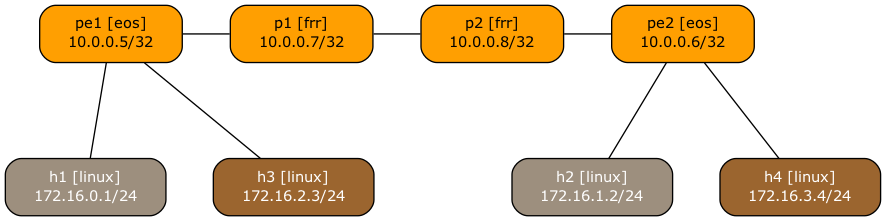
This is the graph netlab created from the lab topology:
Worth Reading: Faster than Dijkstra?
Bruce Davie published a nice article explaining why it makes little sense to use an algorithm that’s supposedly faster than Dijkstra’s in link-state routing protocols.
Other interesting data points from the article (and linked presentations):
- People are running (a few) thousands of routers in a single area
- Running Dijkstra’s algorithm on an emulated network with 2000 nodes took 100 msec… in 2003 (page 18 of this NANOG presentation).
It turns out (as I expected) that all the noise about the need for new routing protocols we were experiencing a few years ago was either due to bad implementations or coming from nerds looking for new toys to play with.
netlab: Using L3VPN (MPLS/VPN) with SR-MPLS Core
Someone recently asked me whether it’s possible to use netlab to build an MPLS/VPN (technically, BGP/MPLS IP VPN) lab with SR-MPLS core. Of course, let’s build a simple lab using Arista EOS and Linux containers to implement this topology:
Lab topology
Here’s the lab topology we’ll use (also available on GitHub):