
Networking Aspects of Running VMs in Containers
It's spaghetti all the way down (see also RFC 1925 rule 6a)
The vrnetlab project and its containerlab fork implement a wonderful idea: let’s package virtual machines (primarily network devices that cannot be containerized) as containers to use reliable orchestration tools like containerlab to provision network topologies.
That approach might have a few drawbacks (depending on how the container images are built), but the obvious elephant in the room is: how do you make the virtual network plumbing work?
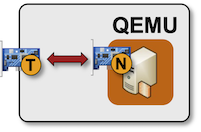
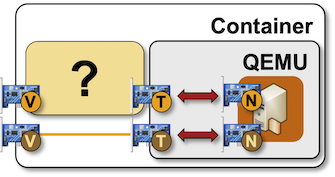
If you want to run VMs in containers, you need the virtualization software (QEMU) running inside the container, and that’s exactly what the vrnetlab-based containers have. As you might remember from the Links in Virtual Labs and Point-to-Point Links in Virtual Labs blog posts, QEMU provides an emulation of a virtual network interface card and shuffles the Ethernet frames between the input/output buffers of that virtual NIC (marked with N in the diagram) and the “outside” Linux tap interface that can be hooked onto any other interface (usually a Linux bridge):
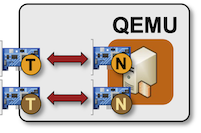
Network devices running in virtual labs usually have a management interface (hopefully in a management VRF) and zero or more data-plane interfaces. Let’s assume we have a VM with a management interface (orange) and a single data-plane interface (brown):
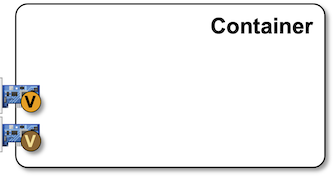
On the other hand, we know (from the same blog posts) that container networking uses vEth pairs (virtual patch cables with transceivers and NICs attached to them😜) to provide connectivity between two network namespaces. A container with a management and a data-plane interface would have the “inside” part of two vEth pairs attached to its networking stack:
Now for the crux of today’s blog post: how do you connect the two? The data-plane container interface is a layer-2 interface (it has no IP addresses), so you can just glue (using tc) the tap interface and the inside part of the vEth pair, and you’ll get frames flowing between the outside end of the vEth pair through the inside end of the vEth pair, the tap interface, and the QEMU vNIC emulation to the input/output buffers of the VM vNIC. The VM can then assign whatever IP address it wants to its vNIC and would experience direct connectivity with other entities attached to the same host Linux bridge (or whatever the outside end of the vEth pair is attached to).
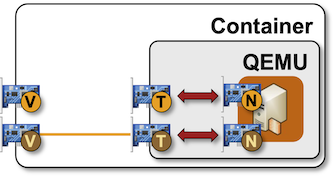
We can’t use the same trick with the management interface. By the time the container is started, the orchestration system (containerlab or Docker/Podman) has already configured its IP address (more details in another blog post). The original vrnetlab code (from 2018) configured a fixed IP address (10.0.0.15) on the VM management interface and used socat as a TCP proxy to forward SSH (and its friends) traffic between the container management IP address and the VM management IP address.
In 2024, the dedicated TCP proxy was replaced with built-in QEMU port forwarding (which had been hanging around, being silently ignored, since ~2007), and in December 2024, the containerlab vrnetlab fork got the transparent management interface with containerlab support coming in release 0.62 (January 2025). That feature copies the IP address Docker assigns to the first container interface (eth0) to the first VM interface (the management interface). With the two interfaces (container and VM management interface) having the same IP address, we need further hacks (stronger tc glue) to make it work.
It took us more than a year to notice that change (we were pretty OK with vrnetlab VMs having whatever working management IP address, as long as it was isolated in a management VRF); netlab started using the transparent management interface in release 26.08.
Yearning for More Details?
Here’s the ip link printout from a container running an OpenBSD VM. You can see the two endpoints of the vEth pairs (eth0@if91, where if91 is the other end of the “cable”, and eth1@if93) and a hanging tap1 interface.
root@dut:/# ip link
1: lo: <LOOPBACK,UP,LOWER_UP> mtu 65536 qdisc noqueue state UNKNOWN mode DEFAULT group default qlen 1000
    link/loopback 00:00:00:00:00:00 brd 00:00:00:00:00:00
2: tap1: <BROADCAST,MULTICAST,UP,LOWER_UP> mtu 65000 qdisc fq_codel state UNKNOWN mode DEFAULT group default qlen 1000
    link/ether a2:9f:be:ff:9f:0a brd ff:ff:ff:ff:ff:ff
90: eth0@if91: <BROADCAST,MULTICAST,UP,LOWER_UP> mtu 1500 qdisc noqueue state UP mode DEFAULT group default
    link/ether 02:42:c0:a8:79:65 brd ff:ff:ff:ff:ff:ff link-netnsid 0
92: eth1@if93: <BROADCAST,MULTICAST,UP,LOWER_UP> mtu 9500 qdisc noqueue state UP mode DEFAULT group default qlen 1000
    link/ether aa:c1:ab:dd:e1:e6 brd ff:ff:ff:ff:ff:ff link-netnsid 1
    altname clab-o-dcb4597617d6fdf9
These are the processes running in that container. There’s the Python script running the container launch code (the init process, so it cannot exit), and the qemu process running the VM emulation:
root@dut:/# ps -ef
UID          PID    PPID  C STIME TTY          TIME CMD
root           1       0  0 09:04 pts/0    00:00:00 python3 /launch.py --username admin --password admin --hostname dut --connection
root          14       1 53 09:04 pts/0    00:01:20 qemu-system-x86_64 -enable-kvm -display none -machine pc -monitor tcp:0.0.0.0:40
root          47       0  0 09:05 pts/1    00:00:00 bash
root          67      47  0 09:06 pts/1    00:00:00 ps -ef
Want to see the whole command line of the qemu process? Here it is; you can see the host forwarding setup for a bunch of ports on the first NIC (scroll far right for details), and the mapping of the tap1 device into a VM NIC.
root@dut:/# ps -p 14 -o args|cat
COMMAND
qemu-system-x86_64 -enable-kvm -display none -machine pc
  -monitor tcp:0.0.0.0:4000,server,nowait
  -serial telnet:0.0.0.0:5000,server,nowait -m 512
  -cpu host -smp 1
  -drive if=ide,file=/openbsd-min_v7.7_2025-04-28-11-38-overlay.qcow2
  -cdrom /cloud_init.iso
  -device pci-bridge,chassis_nr=1,id=pci.1
  -device virtio-net-pci,netdev=p00,mac=0C:00:fe:e9:cf:00,bus=pci.1
  -netdev user,id=p00,net=10.0.0.0/24,host=10.0.0.2,dns=10.0.0.3,dhcpstart=10.0.0.15,hostfwd=tcp:0.0.0.0:22-10.0.0.15:22,hostfwd=udp:0.0.0.0:161-10.0.0.15:161,hostfwd=tcp:0.0.0.0:80-10.0.0.15:80,hostfwd=tcp:0.0.0.0:443-10.0.0.15:443,hostfwd=tcp:0.0.0.0:830-10.0.0.15:830,hostfwd=tcp:0.0.0.0:6030-10.0.0.15:6030,hostfwd=tcp:0.0.0.0:8080-10.0.0.15:8080,hostfwd=tcp:0.0.0.0:9339-10.0.0.15:9339,hostfwd=tcp:0.0.0.0:32767-10.0.0.15:32767,hostfwd=tcp:0.0.0.0:50051-10.0.0.15:50051,hostfwd=tcp:0.0.0.0:57400-10.0.0.15:57400,tftp=/tftpboot -device virtio-net-pci,netdev=p01,mac=0C:00:e8:0e:01:01,bus=pci.1,addr=0x2
  -netdev tap,id=p01,ifname=tap1,script=/etc/tc-tap-ifup,downscript=no
What about the tc glue between eth1 and tap1? Here it is:
root@dut:/# tc filter show dev eth1 ingress
filter protocol all pref 49152 flower chain 0
filter protocol all pref 49152 flower chain 0 handle 0x1
  not_in_hw
	action order 1: mirred (Egress Redirect to device tap1) stolen
	index 1 ref 1 bind 1

root@dut:/# tc filter show dev tap1 ingress
filter protocol all pref 49152 flower chain 0
filter protocol all pref 49152 flower chain 0 handle 0x1
  not_in_hw
	action order 1: mirred (Egress Redirect to device eth1) stolen
	index 2 ref 1 bind 1
The Management Passthrough Hack
Finally, how is the management passthrough implemented? Here’s the vrnetlab container script that sets up tc rules between eth0 (container management interface) and tap0 (which gets connected to the VM management NIC):
#!/bin/bash

ip link set tap0 up
ip link set tap0 mtu 65000

# disable IPv6 to avoid sending periodic traffic like router solicitations from the vrnetlab container
ip -6 addr flush $TAP_IF

# create tc eth<->tap redirect rules

tc qdisc add dev eth0 clsact
# exception for TCP ports 5000-5007
tc filter add dev eth0 ingress prio 1 protocol ip flower ip_proto tcp dst_port 5000-5007 action pass
# mirror ARP traffic to container
tc filter add dev eth0 ingress prio 2 protocol arp flower action mirred egress mirror dev tap0
# redirect rest of ingress traffic of eth0 to egress of tap0
tc filter add dev eth0 ingress prio 3 flower action mirred egress redirect dev tap0

tc qdisc add dev tap0 clsact
# redirect all ingress traffic of tap0 to egress of eth0
tc filter add dev tap0 ingress flower action mirred egress redirect dev eth0

# clone management MAC of the VM
ip link set dev eth0 address 0C:00:5d:18:38:00
It’s pretty self-explanatory1:
- IPv6 is disabled on the container interface to prevent interference from the container IPv6 stack (IPv4 stack is silent until prodded).
- TCP ports 5000-5007 are accepted by the container TCP stack.
- All other traffic (but ARP in particular) is mirrored from
eth0totap0. Everything is mirrored fromtap0toeth0. - Finally, just to make sure we don’t get duplicate ARP entries or MAC addresses, and to keep the container IP stack working on TCP ports 5000-5007 after the VM starts sending out gratuitous ARPs, the VM MAC address (as assigned by the Python launch process and passed to QEMU as a CLI parameter) is copied to the container
eth0address.
-
It’s also one of the more convoluted virtual networking hairballs I’ve seen so far. ↩︎
Seems all overly complicated to me. The host side of the virtual qemu interface (the tap interface) could just be moved out of the container's network namespace into the root network namespace after qemu has created the interface. No veth pairs with and tc redirect glue needed.
Even if that were implemented perfectly (which would be a major change in the orchestration process and require synchronization between host and container processes), you'd still have the challenge of creating a P2P link between two containers.
Today, a P2P link is just a vEth cable between a pair of containers. With your approach, you'd need some extra glue between two tap interfaces pulled out of the container namespaces.