
Category: CEF
CEF punt adjancency
In "border cases" you might find interesting CEF adjacencies in your CEF adjacency table (displayed with show ip cef adjacency). Most common one is the glean adjacency used for directly connected routes (this adjacency type is a placeholder that indicates the router it should perform the ARP table lookup and send the packet to directly connected neighbor). Discard, Drop, Noroute and Null adjacencies are obvious, the "weird" one is the Punt adjacency, which indicates that the router cannot CEF-switch the packet toward the destination (due to a feature being used that is not yet supported by CEF), thus the packet is punted to the next switching method (fast switching and ultimately process switching).
Per-Port CEF Load Balancing
In designs with very low number of IP hosts, no per-destination load-sharing algorithm will work adequately. Consider, for example, an extranet design where a large number of IP hosts are NAT-ed to a single IP address which then accesses a single remote server.
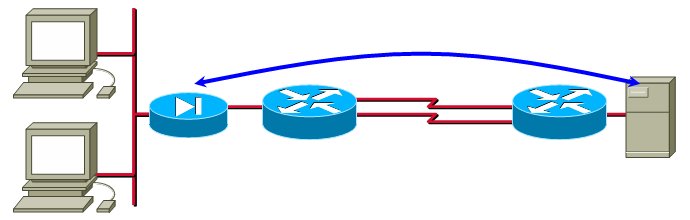
In this design, all the traffic flows between a single pair of IP addresses, making per-destination load-sharing unusable.
Per-destination or per-packet CEF load sharing?
Cisco Express Forwarding (CEF) can perform per-packet or per-destination (actually source/destination IP address pair) load-sharing with no performance degradation (without CEF, per-packet load-sharing requires process switching).
Even though there is no performance impact on the router, per-packet load sharing will almost always result in out-of-order packets. The packet reordering might degrade TCP throughput in high-speed environments (in low-speed/few-flows scenarios, per-packet load-sharing actually improves the per-flow throughput) or severely impact applications that cannot survive out-of-order packet delivery, such as Fast Sequenced Transport for SNA over IP or voice/video streams.
Which switching path does an IOS feature use
I've got an excellent question recently: Which switching path is used in Zone-based firewalls when a packet is dropped? As usual, IOS documentation was not very helpful (which is understandable as the answer might depend on hardware platform, interface encapsulation, other features configured on the router etc.). However, there is a great tool to use - the show interface stats command.
Fine-Tuning CEF Load Balancing
In environments with a low number of IP hosts you have to fine-tune the CEF load-sharing algorithm to ensure that the traffic is spread between all parallel paths. A typical scenario is a primary-backup data center setup with pairs of replicating servers, as shown in the figure below.
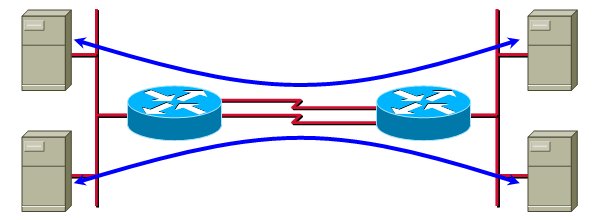
In these cases, you have to try different values of seed parameter of the CEF universal algorithm.
CEF per-destination load sharing algorithms
According to the Cisco IOS documentation, you can select between the original and the universal CEF load sharing algorithm with the ip cef load-sharing algorithm name parameter global configuration command (we'll leave the tunnel algorithm aside for the moment). Of course, they don't tell you what you select.
CEF load sharing details
I had to investigate the details of CEF load sharing for one of my upcoming article and found (yet again) that the details are rather undocumented in official documentation. So, this is how it works (in case you ever need to know):