
Category: BGP
The Curious Case of the BGP Connect State
I got this question from Paul:
Have you ever seen a BGP peer in the “Connect” state? In 20 years, I have never been able to see or reproduce this state, nor any mention in a debug/log. I am starting to believe that all the documentation is BS, and this does not exist.
The BGP Finite State Machine (FSM) (at least the one defined in RFC 4271 and amended in RFC 9687) is “a bit” hard to grasp but the basics haven’t changed from the ancient days of RFC 1771:
Use BGP Outbound Route Filters (ORF) for IP Prefixes
When a BGP router cannot fit the whole BGP table into its forwarding table (FIB), we often use inbound filters to limit the amount of information the device keeps in its BGP table. That’s usually a waste of resources:
- The BGP neighbor has to send information about all prefixes in its BGP table
- The device with an inbound filter wastes additional CPU cycles to drop many incoming updates.
Wouldn’t it be better for the device with an inbound filter to push that filter to its BGP neighbors?
IBGP Is the Better EBGP
Whenever I was explaining how one could build EBGP-only data center fabrics, someone would inevitably ask, “But could you do that with IBGP?”
TL&DR: Of course, but that does not mean you should.
Anyway, leaving behind the land of sane designs, let’s trot down the rabbit trail of IBGP-only networks.
Use Disaggregated BGP Prefixes to Influence Inbound Internet Traffic
As much as I love explaining how to use BGP in an optimal way, sometimes we have to do what we know is bad to get the job done. For example, if you have to deal with clueless ISPs who cannot figure out how to use BGP communities, you might be forced to use the Big Hammer of disaggregated prefixes. You can practice how that works in the next BGP lab exercise.
Video: Internet Routing Security (DEEP 2023)
My Internet Routing Security talk from last year’s DEEP conference (a shorter version of the Internet Routing Security webinar) is now available on YouTube.
Hope you’ll find it useful ;)
IBGP Source Interface Selection Still Requires Configuration
A fellow networking engineer recently remarked, “FRRouting automatically selects the correct [IBGP] source interface even when not configured explicitly.”
TL&DR: No, it does not. You were just lucky.
Basics first1. BGP runs over TCP sessions. One of the first things a router does when establishing a BGP session with a configured neighbor is to open a TCP session with the configured neighbor’s IP address.
Dynamic BGP Peers
You might have an environment where a route reflector (or a route server) has dozens or hundreds of BGP peers. Configuring them by hand is a nightmare; you should either build a decent automation platform or use dynamic BGP neighbors – a feature you can practice in the next lab exercise.
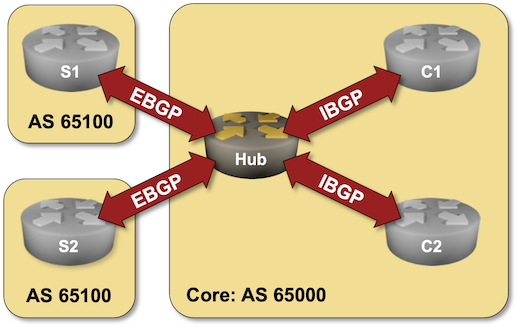
Click here to start the lab in your browser using GitHub Codespaces (or set up your own lab infrastructure). After starting the lab environment, change the directory to session/9-dynamic and execute netlab up.
Using a BGP Route Server in an Internet Exchange Point
A BGP route server is like a BGP route reflector but for EBGP sessions. In its simplest implementation, it receives BGP updates over EBGP sessions and propagates them over other EBGP sessions without inserting its own AS number in the AS path (more details).
BGP route servers are commonly used on Internet Exchange Points (IXPs), and that’s what you can practice in the BGP Route Server in an Internet Exchange Point lab exercise.
Using BGP NO_EXPORT Community to Filter Transit Routes
In previous BGP policy lab exercises, we covered several mechanisms you can use to ensure your autonomous system is not leaking transit routes (because bad things happen when you do, particularly when your upstream ISP is clueless).
As you probably know by now, there’s always more than one way to get something done with BGP. Today, we’ll explore how you can use the NO_EXPORT community to filter transit routes.
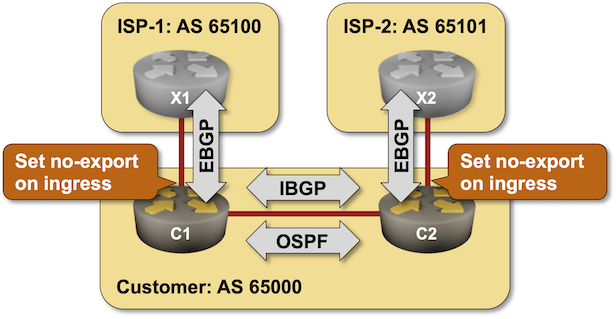
Click here to start the lab in your browser using GitHub Codespaces (or set up your own lab infrastructure). After starting the lab environment, change the directory to policy/d-no-export and execute netlab up.
BGP Labs: Improvements (September 2024)
I spent a few days in a beautiful place with suboptimal Internet connectivity. The only thing I could do whenever I got bored (without waiting for the Internet gnomes to hand-carry the packets across the mountain passes) was to fix the BGP labs on a Ubuntu VM running on my MacBook Air (hint: it all works).
Big things first. I added validation to these labs: