
Decent DNS, DHCP and HTTP server on an ISR router
Readers of my blog have probably noticed that I’m occasionally documenting the shortcomings of DNS and DHCP servers built into Cisco IOS (I will not even mention the HTTP server, this one gets constantly degraded). On the other hand, although you could centralize all these services, the centralization makes the branch offices completely dependent on the availability of WAN uplinks; without a working uplink, a branch office stops completely.
The hidden wealth of IOS Tcl
Another undocumented (and thus very probably unsupported) Tcl-on-IOS detail: numerous Tcl packages are bundled with IOS and available in the tmpsys:lib/tcl directory (the tmpsys: is a virtual file system mapped to a part of the IOS image).
Interactions between IP routing and QoS
One of my readers sent me an interesting question a while ago:
I reviewed one of your blog posts "Per-Destination or Per Packet CEF Load Sharing?" and wondered if you had investigated previously on how MQC QoS worked together with the CEF load-sharing algorithm (or does it interact at all)? For example, let's say I have two equal cost paths between two routers and the routing table (as well as CEF) sees both links as equal paths to the networks behind each router. On each link I have the same outbound service policy applied with a simple LLQ, BW, and a class-default queues. Does CEF check each IP flow and make sure both link's LLQ and BW queues are evenly used?
Unfortunately, packet forwarding and QoS are completely uncoupled in Cisco IOS. CEF performs its load balancing algorithm purely on source/destination information and does not take in account the actual utilization of outbound interfaces. If you have bad luck, most of the traffic ends on one of the links and the packets that would easily fit on the other link will be dropped by the QoS mechanisms.
Flash-based DHCP database
Pete sent me an interesting question a while ago:
It might be interesting to write an article about ip dhcp database flash:dhcp-db command, documenting the pros of surviving a reboot versus cons of wear on the flash device.
I’ve already written about a few problems that can be solved with the DHCP database (but obviously a longer text is warranted … already stored in my to-do list) and it took me a while to find the time to dig out the relevant information on the flash device wear.
EBGP Multipath Load Sharing and CEF
When I was discussing the details of the BGP troubleshooting video with one of my readers, he pointed out that I should mention the need for CEF switching in EBGP multipath scenario. My initial response was “Why would you need CEF? EBGP multipath is older than CEF” and his answer told me I should turn on my gray cells before responding to emails: “Your video as well as Cisco’s web site recommends CEF for EBGP multipath design… but interestingly, it does work without CEF”.
Generate HTTP(S) requests from Tcl shell
A few days ago, a reader sent me an e-mail titled “Telnet Automation from a Cisco Router” and complained that IOS Tcl does not support the expect commands (spawn, send and expect). Since Expect is a Tcl extension, not part of the core Tcl, it’s not included in Cisco IOS, which was the only answer I could give.
Can brain dumps be stopped?
Brain dumps are the biggest threat to the certification industry these days, significantly devaluing certifications that rely primarily on multiple-choice answers. Similarly to the threat-prevention measures adopted by airport security (read the insightful analysis of their behavior from Bruce Schneier, a renowned security guru), IT vendors are responding with high-tech measures.
Extranet with Overlapping Addresses
The idea to write an article describing how you can use MPLS VPN-enabled NAT to implement flexible extranets that allow participants to retain their existing (and sometimes overlapping) IP address space has been sitting in my to-do list for over a year.
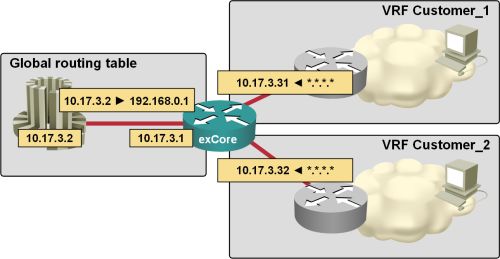
After I’ve finally written it (without even hinting what I’ve been working on), I got several e-mails from my readers asking the questions this article answers, so it looks like the topic has suddenly become very hot. Do you have any ideas why that would be the case?
Test the real-life skills of your job candidates
Numerous companies use certifications to screen job candidates. Even if all the caveats associated with this process are given, you might encounter candidates who have multiple high-level certifications but cannot differentiate a router from a box of cheese. How can you identify (and reject) such people?
Is it wise to use certifications in the candidate selection process?
My previous certification-related post described how some companies use certifications to filter job applicants for networking-related positions. Should you follow that example? If you’re in a country with a saturated job market, where the number of applicants far exceeds the number of job postings (consider yourself very lucky if you’re an employer), you should certainly use whatever filters you can to screen the hundreds of applications you receive … but be aware that you have potentially lost a few gems hidden in the flood.