
Configure DNS Servers Through IPCP
After I've fixed the default routing in my home office, I've stumbled across another problem: the two ISPs I'm using for my primary and backup link have DNS servers that reply solely to the DNS requests sent from their own IP address range:
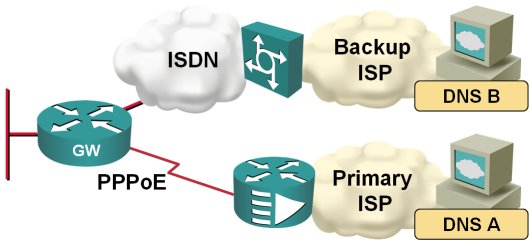
When the traffic is switched from the primary to the backup ISP, I therefore also need to switch the DNS servers. Fortunately, this is quite easy to do on a router; you just need to configure ppp ipcp dns request on the dialer interface and the router starts asking for the DNS server address as part of the IPCP negotiation.
Enhanced show interfaces command
It's amazing how many options (most of them still undocumented) the show interfaces command accepts in IOS release 12.4T (I won't even start guessing when each one was introduced, if you're running old IOS releases, please feel free to comment):
- show interfaces description displays interface names, L1 and L2 status (line and line-protocol status) and interface description. Extremely handy if you want to check which interfaces are up/down.
- show interfaces counters protocol status displays the L3 protocols active on each interface.
- show interfaces summary displays the state of various interface queues and related drop counters in a nice tabular format.
- show interfaces accounting displays per-protocol in/out counters.
Here are a few sample printouts:
Can I combine EEM applets with Tcl shell?
When I’ve been describing the limitations of kron, someone quickly asked an interesting question:
As I cannot insert extra input keystrokes with EEM applet, can I run a Tcl script from it with the action sequence cli command “tclsh script” command and use the typeahead function call to get around the limitation?”
The only answer I could give at that time was “maybe” … and obviously it was time for a more thorough test. The short result is: YES, you can do it (at least in IOS release 12.4(15)T1).
Kron: poor-man's cron
When two groups within Cisco needed time-based command execution in Cisco IOS, they (in a typical big-corporation fashion) decided to implement the same wheel from two different sets of spokes and rims. One group built the Embedded Event Manager with its event timer cron command (introduced in 12.2(25)S and 12.3(14)T), the other group created the more limited kron command set (introduced in 12.3(1)).
Install default route with PPP
In my home office, I'm using DSL access to the Internet with ISDN backup to another ISP, as shown on the next figure:
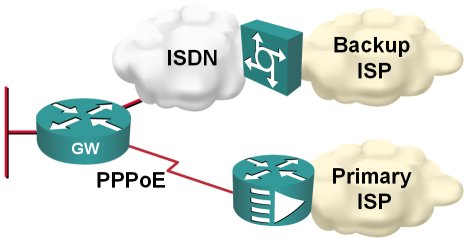
Obviously, I would like the ISDN backup to kick in whenever the primary connection goes down; two static default routes and reliable static routing on the primary default seem like a perfect solution.
Enable password or enable secret?
I've stumbled across a blog post that indicates there's still confusion on some fundamental configuration issues. I will not even try to guess whether there is a wide consensus on how to configure a router, but these are the facts (and here is a ten year old position from Cisco):
- Type-7 encryption used in enable password has been broken. Source code for the decrypt program and cracker programs are available online, or you could use a router to do it for you.
- The type-7 encryption is reversible (and easily breakable due to a weak algorithm), whereas type-5 encryption is a one-way encryption that probably requires a dictionary attack to break.
- Based on the previous two facts, you should never use enable password. Use enable secret.
- The service password-encryption encodes passwords attached to local usernames with type-7 encryption. The usage of type-7 encryption is necessary as you might need the cleartext passwords in some authentication mechanisms (for example, CHAP). However, it's still better to have scrambled passwords than cleartext ones; at least a casual observer will not be able to read them. Conclusion: use service password-encryption.
- If your authentication methods don't need cleartext passwords (examples: local username/password authentication, local AAA authentication or PAP authentication), use username secret configuration command (available from IOS releases 12.2T, 12.3 and 12.0S).
Emulate dialup links with serial lines
I had to figure out various PPP parameters (and associated Cisco IOS behavior) and didn't have real dial-up equipment in my lab setup. I could have gone with PPPoE, but it turned out it's way simpler to emulate dialup connections (at least the PPP negotiations work as expected) on fixed serial lines. This is the minimum setup you need on the “caller” side …
interface Serial1/0
 ip address negotiated
 encapsulation ppp
 ppp authentication pap optional
 ppp pap sent-username client password 0 client
… and this is the “server”-side configuration:
Use BGP Default Route to Replace Static Routing
Martin Kluge sent me an interesting BGP question: he has two upstream links and runs BGP on both. Since his router is low on RAM, he cannot accept full routing, so he’s just announcing his IP prefix and using static default routing toward upstream ISPs.
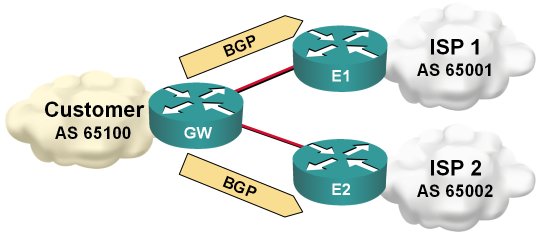
Static default routing toward upstream ISP
Type 7 decryption in Cisco IOS
Tim Riegert sent me an interesting hint: you don't need password crackers to decode type-7 passwords, you just need access to a router. Here's how you do it:
We'll turn on type-7 encryption for local passwords and generate a test username
Show active IOS processes
You can use the show process cpu sorted command in combination with an output filter to display only those IOS processes that consumed noticeable amount of CPU time in the last five minutes, last minute or last five seconds. Use the following patterns to construct your regular expression:
- The [0-9.]+% pattern will match any non-zero percentage;
- The 0.00% pattern will obviously match the zero-percentage display;
- As the percentage figures are separated by various amounts of whitespace characters, we have to use the ' +' pattern to match those;
The show filter should exclude the processes that have the zero percentage in the desired column and any percentage in the other two columns (any other filter would show too many or too few processes). To display processes active in the last minute, use the show process cpu sorted 1min | exclude [0-9.]+% +0.00% +[0-9.]+% command (and define an alias to make it easier to use).