
Deploy Partially-Configured Training Labs with netlab
Imagine you want to use netlab to build training labs, like the free BGP labs I created. Sometimes, you want to give students a device to work on while the other lab devices are already configured, just waiting for the students to get their job done.
For example, in the initial BGP lab, I didn’t want any BGP-related configuration on RTR while X1 would already be fully configured – when the student configures BGP on RTR, everything just works.
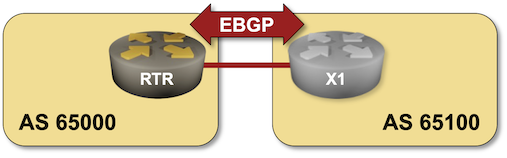
A picture is worth a thousand words, they say. Well, you get the idea ;)
netlab wasn’t designed to handle this scenario; I used it to build baseline configurations that the user would then expand. However, there’s always another nerd knob. There were three tricks one could use in the past to get the job done:
- Use a custom configuration template that would deconfigure BGP on RTR and save the modified configuration.
- Use a plugin that would remove bgp from the list of modules on RTR at the end of the lab topology transformation (so we’d still get the BGP neighbor on X1)
- A dirty trick that I don’t want to explain in any detail. Of course, I used this one.
Release 26.01 gives you a clean option: you can use the skip_config node (or group) attribute to tell netlab initial which parts of the device configuration to skip. Using that attribute, the lab topology for the initial BGP lab becomes much simpler (original topology):
plugin: [ bgp.session ]version: 26.01module: [ bgp ]groups:external:members: [ x1 ]nodes:rtr:bgp.as: 65000skip_config: [ bgp ]x1:bgp.as: 65100id: 10links:- rtr:x1:bgp.default_originate: True
Notes:
- The minimum netlab version this lab topology works with is 26.01 (line 3)
- The BGP configuration module is used on all devices (line 4)
- However, netlab should not configure BGP on RTR (line 13)