
Video: EVPN Multihoming Taxonomy and Overview
I promised you a blog post explaining the intricacies of implementing MLAG with EVPN, but (as is often the case) it’s taking longer than expected. In the meantime, enjoy the EVPN Multihoming Taxonomy and Overview video from Lukas Krattiger’s EVPN Multihoming versus MLAG presentation (part of EVPN Deep Dive webinar).
New Webinar: Internet Routing Security
I’m always in a bit of a bind when I get an invitation to speak at a security conference (after all, I know just enough about security to make a fool of myself), but when the organizers of the DEEP Conference invited me to talk about Internet routing security I simply couldn’t resist – the topic is dear and near to my heart, and I planned to do a related webinar for a very long time.
Even better, that conference would have been my first on-site presentation since the COVID-19 craze started, and I love going to Dalmatia (where the conference is taking place). Alas, it was not meant to be – I came down with high fever just days before the conference and had to cancel the talk.
Why Do We Need IBGP Full Mesh?
Here’s another question from the excellent list posted by Daniel Dib on Twitter:
BGP Split Horizon rule says “Don’t advertise IBGP-learned routes to another IBGP peer.” The purpose is to avoid loops because it’s assumed that all of IBGP peers will be on full mesh connectivity. What is the reason the BGP protocol designers made this assumption?
Time for another history lesson. BGP was designed in late 1980s (RFC 1105 was published in 1989) as a replacement for the original Exterior Gateway Protocol (EGP). In those days, the original hub-and-spoke Internet topology with NSFNET core was gradually replaced with a mesh of interconnections, and EGP couldn’t cope with that.
… updated on Thursday, October 20, 2022 13:54 UTC
On Applicability of MPLS Segment Routing (SR-MPLS)
Whenever I compare MPLS-based Segment Routing (SR-MPLS) with it’s distant IPv6-based cousin (SRv6), someone invariably mentions the specter of large label stacks that some hardware cannot handle, for example:
Do you think vendors current supported label max stack might be an issue when trying to route a packet from source using Adj-SIDs on relatively big sized (and meshed) cores? Many seem to be proposing to use SRv6 to overcome this.
I’d dare to guess that more hardware supports MPLS with decent label stacks than SRv6, and if I’ve learned anything from my chats with Laurent Vanbever, it’s that it sometimes takes surprisingly little to push the traffic into the right direction. You do need a controller that can figure out what that little push is and where to apply it though.
netlab Router-on-a-Stick Example
In early June 2022 I described a netlab topology using VLAN trunks in netlab. That topology provided pure bridging service for two IP subnets. Now let’s go a step further and add a router-on-a-stick:
- S1 and S2 are layer-2 switches (no IP addresses on red or blue VLANs).
- ROS is a router-on-a-stick routing between red and blue VLANs.
- Hosts on red and blue VLANs should be able to ping each other.
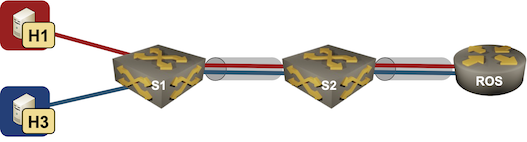
Lab topology
netlab Release 1.3.3: Bug Fixes
Just FYI: I pushed out netlab release 1.3.3 yesterday. It’s a purely bug fix release, new functionality and a few breaking changes are coming in release 1.4 in a few weeks.
Some of the bugs we fixed weren’t exactly pleasant; if you’re using release 1.3.2 you might want to upgrade with pip3 install --upgrade networklab.
EVPN VLAN-Aware Bundle Service
In the EVPN/MPLS Bridging Forwarding Model blog post I mentioned numerous services defined in RFC 7432. That blog post focused on VLAN-Based Service Interface that mirrors the Carrier Ethernet VLAN mode.
RFC 7432 defines two other VLAN services that can be used to implement Carrier Ethernet services:
- Port-based service – whatever is received on the ingress port is sent to the egress port(s)
- VLAN bundle service – multiple VLANs sharing the same bridging table, effectively emulating single outer VLAN in Q-in-Q bridging.
And then there’s the VLAN-Aware Bundle Service, where a bunch of VLANs share the same MPLS pseudowires while having separate bridging tables.
OSPF External Routes (Type-5 LSA) Mysteries
Daniel Dib posted a number of excellent questions on Twitter, including:
While forwarding a received Type-5 LSA to other areas, why does the ABR not change the Advertising Router ID to it’s own IP address? If ABR were able to change the Advertising Router ID in the Type-5 LSA, then there would be no need for Type-4 LSA which meant less OSPF overhead on the network.
TL&DR: The current implementation of external routes in OSPF minimizes topology database size (memory utilization)
Before going to the details, try to imagine the environment in which OSPF was designed, and the problems it was solving.
Cumulus Linux NVUE: an Incomplete Data Model
A few weeks ago I described how Cumulus Linux tried to put lipstick on a pig reduce the Linux data plane configuration pains with Network Command Line Utility. NCLU is a thin shim that takes CLI arguments, translates them into FRR or ifupdown configuration syntax, and updates the configuration files (similar to what Ansible is doing with something_config modules).
Obviously that wasn’t good enough. Cumulus Linux 4.4 introduced NVIDIA User Experience1 – a full-blown configuration engine with its own data model and REST API2.
netlab Release 1.3.2: Mikrotik RouterOS 7, Additional EVPN Platforms
The star of the netlab release 1.3.2 is Mikrotik RouterOS version 7. Stefano Sasso did a fantastic job adding support for VLANs, VRFs, OSPFv2, OSPFv3, BGP, MPLS, and MPLS/VPN, plus the libvirt box-building recipe.
Jeroen van Bemmel contributed another major PR1 adding VLANs, VRFs, VXLAN, EVPN, and OSPFv3 to Nokia SR OS.
Other platform improvements include: