
Multi-Pod EVPN Troubleshooting: Extended BGP Communities
Last week, we fixed the mismatched route targets in our sample multi-pod EVPN fabric. With that fixed, every PE device should see every other PE device as a remote VTEP for ingress replication purposes. We got that to work on Site-A (AS 65001), but not on Site-B (AS 65002); let’s see what else is broken.
Note: This is the fifth blog post in the Multi-Pod EVPN series. If you stumbled upon it, start with the design overview and troubleshooting overview posts. More importantly, familiarize yourself with the topology we’ll be using; it’s described in the Multi-Pod EVPN Troubleshooting: Fixing Next Hops.
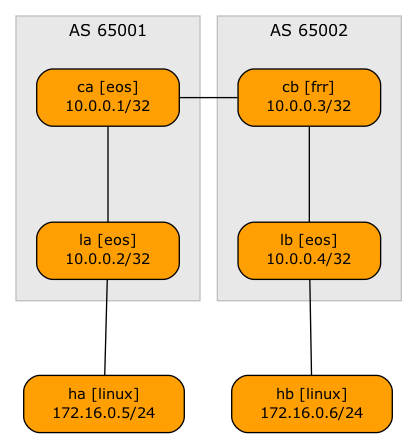
Ready? Let’s go. Here’s our network topology:
What’s the Problem?
Once again, we’ll look at the EVPN type-3 (Inclusive Multicast Ethernet Tag) route (here’s why) on the misbehaving leaf switch (LB). This is the printout you would get on LB after fixing the BGP next hop misconfiguration:
lb#show bgp evpn route-type imet
BGP routing table information for VRF default
Router identifier 10.0.0.4, local AS number 65002
Route status codes: * - valid, > - active, S - Stale, E - ECMP head, e - ECMP
                    c - Contributing to ECMP, % - Pending best path selection
Origin codes: i - IGP, e - EGP, ? - incomplete
AS Path Attributes: Or-ID - Originator ID, C-LST - Cluster List, LL Nexthop - Link Local Nexthop

          Network                Next Hop              Metric  LocPref Weight  Path
 * >      RD: 10.0.0.2:1000 imet 10.0.0.2
                                 10.0.0.2              -       100     0       65001 i
 * >      RD: 10.0.0.4:1000 imet 10.0.0.4
                                 -                     -       -       0       i
The routes look good, the next hops are correct, and the routes are valid and best. However, LB refuses to recognize LA as the remote VTEP for our VLAN.
lb#show vxlan vtep
Remote VTEPS for Vxlan1:

VTEP       Tunnel Type(s)
---------- --------------

Total number of remote VTEPS:  0
The Details Matter (Again)
As before, let’s look into the details of the IMET routes. This time, the differences between the local and the remote route should be easy to spot:
lb#show bgp evpn route-type imet detail
BGP routing table information for VRF default
Router identifier 10.0.0.4, local AS number 65002
BGP routing table entry for imet 10.0.0.2, Route Distinguisher: 10.0.0.2:1000
 Paths: 1 available
  65001
    10.0.0.2 from 10.0.0.3 (10.0.0.3)
      Origin IGP, metric -, localpref 100, weight 0, tag 0, valid, internal, best
      VNI: 101000
      PMSI Tunnel: Ingress Replication, MPLS Label: 101000, Leaf Information Required: false, Tunnel ID: 10.0.0.2
BGP routing table entry for imet 10.0.0.4, Route Distinguisher: 10.0.0.4:1000
 Paths: 1 available
  Local
    - from - (0.0.0.0)
      Origin IGP, metric -, localpref -, weight 0, tag 0, valid, local, best
      Extended Community: Route-Target-AS:65000:1000 TunnelEncap:tunnelTypeVxlan
      VNI: 101000
      PMSI Tunnel: Ingress Replication, MPLS Label: 101000, Leaf Information Required: false, Tunnel ID: 10.0.0.4
Hint: the remote EVPN routes have no extended BGP communities. No wonder EVPN doesn’t work as expected.
Here’s the crux of the problem: most EVPN implementations were optimized to be used the way EVPN was envisioned (a single autonomous system with an IGP and IBGP). Making them work in an EBGP environment requires nerd-knob tuning; in our case, we have to enable extended BGP community propagation for the EBGP EVPN address family on Arista EOS.
After fixing the extended BGP community propagation on CA, LB receives remote EVPN routes with the expected extended communities:
lb#show bgp evpn route-type imet detail
BGP routing table information for VRF default
Router identifier 10.0.0.4, local AS number 65002
BGP routing table entry for imet 10.0.0.2, Route Distinguisher: 10.0.0.2:1000
 Paths: 1 available
  65001
    10.0.0.2 from 10.0.0.3 (10.0.0.3)
      Origin IGP, metric -, localpref 100, weight 0, tag 0, valid, internal, best
      Extended Community: Route-Target-AS:65000:1000 TunnelEncap:tunnelTypeVxlan
      VNI: 101000
      PMSI Tunnel: Ingress Replication, MPLS Label: 101000, Leaf Information Required: false, Tunnel ID: 10.0.0.2
BGP routing table entry for imet 10.0.0.4, Route Distinguisher: 10.0.0.4:1000
 Paths: 1 available
  Local
    - from - (0.0.0.0)
      Origin IGP, metric -, localpref -, weight 0, tag 0, valid, local, best
      Extended Community: Route-Target-AS:65000:1000 TunnelEncap:tunnelTypeVxlan
      VNI: 101000
      PMSI Tunnel: Ingress Replication, MPLS Label: 101000, Leaf Information Required: false, Tunnel ID: 10.0.0.4
Based on the corrected EVPN routes, LB recognizes LA as a remote VTEP:
lb#show vxlan vtep
Remote VTEPS for Vxlan1:

VTEP           Tunnel Type(s)
-------------- --------------
10.0.0.2       flood

Total number of remote VTEPS:  1
And finally, HA can ping HB. Mission Accomplished 🎉
$ netlab connect ha ping hb
Connecting to container clab-tshootmultip-ha, executing ping hb
PING hb (172.16.0.6): 56 data bytes
64 bytes from 172.16.0.6: seq=0 ttl=64 time=5.534 ms
64 bytes from 172.16.0.6: seq=1 ttl=64 time=2.591 ms
64 bytes from 172.16.0.6: seq=2 ttl=64 time=2.514 ms
64 bytes from 172.16.0.6: seq=3 ttl=64 time=3.171 ms
^C
--- hb ping statistics ---
4 packets transmitted, 4 packets received, 0% packet loss
round-trip min/avg/max = 2.514/3.452/5.534 ms